Azure VMware Solution: Gen 1 vs Gen 2 - What's Actually Changed?
Azure VMware Solution Generation 2 now deploys inside an Azure Virtual Network. Here's what's changed, what to watch out for, and whether you should move.

Cloud Stack
Mar 19, 2026 · 7 min read
A Bit of Background
Azure VMware Solution (AVS) has always sat in an interesting place — it lets you run VMware workloads natively on Azure dedicated hardware, bridging the gap between on-premises VMware environments and the Azure cloud. Gen 1 worked well, but it came with a networking model that felt distinctly un-Azure. ExpressRoute circuits, seed cluster requirements, and additional networking setup were the price of admission.
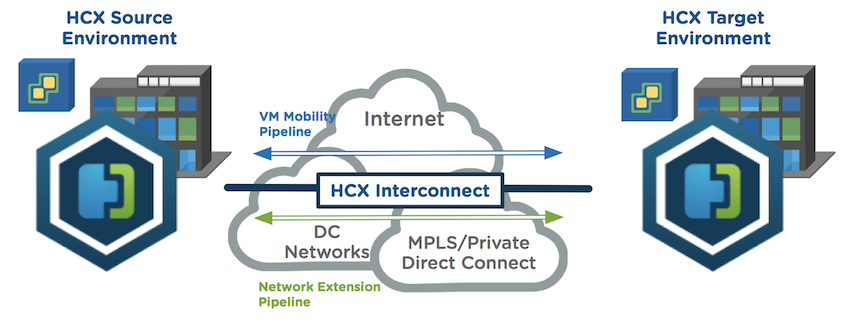
It has been particularly popular because leveraging VMware HCX allows customers to extend their on-premises IP address space directly into AVS using Layer 2 network extensions. This means workloads can be migrated without re-IP-ing — a huge operational win that removes one of the biggest friction points in any data centre migration project.
Gen 2 changes that. Microsoft has re-engineered AVS to deploy directly inside an Azure Virtual Network, bringing it in line with how everything else in Azure works. That single shift has a cascade of positive effects — fewer moving parts, better performance, and a dramatically simpler path to Azure-native integration.
Gen 1 vs Gen 2: Side by Side
The diagrams below show the most fundamental change — the shift from a dedicated ExpressRoute circuit inside AVS in Gen 1, to native Virtual Network integration in Gen 2:
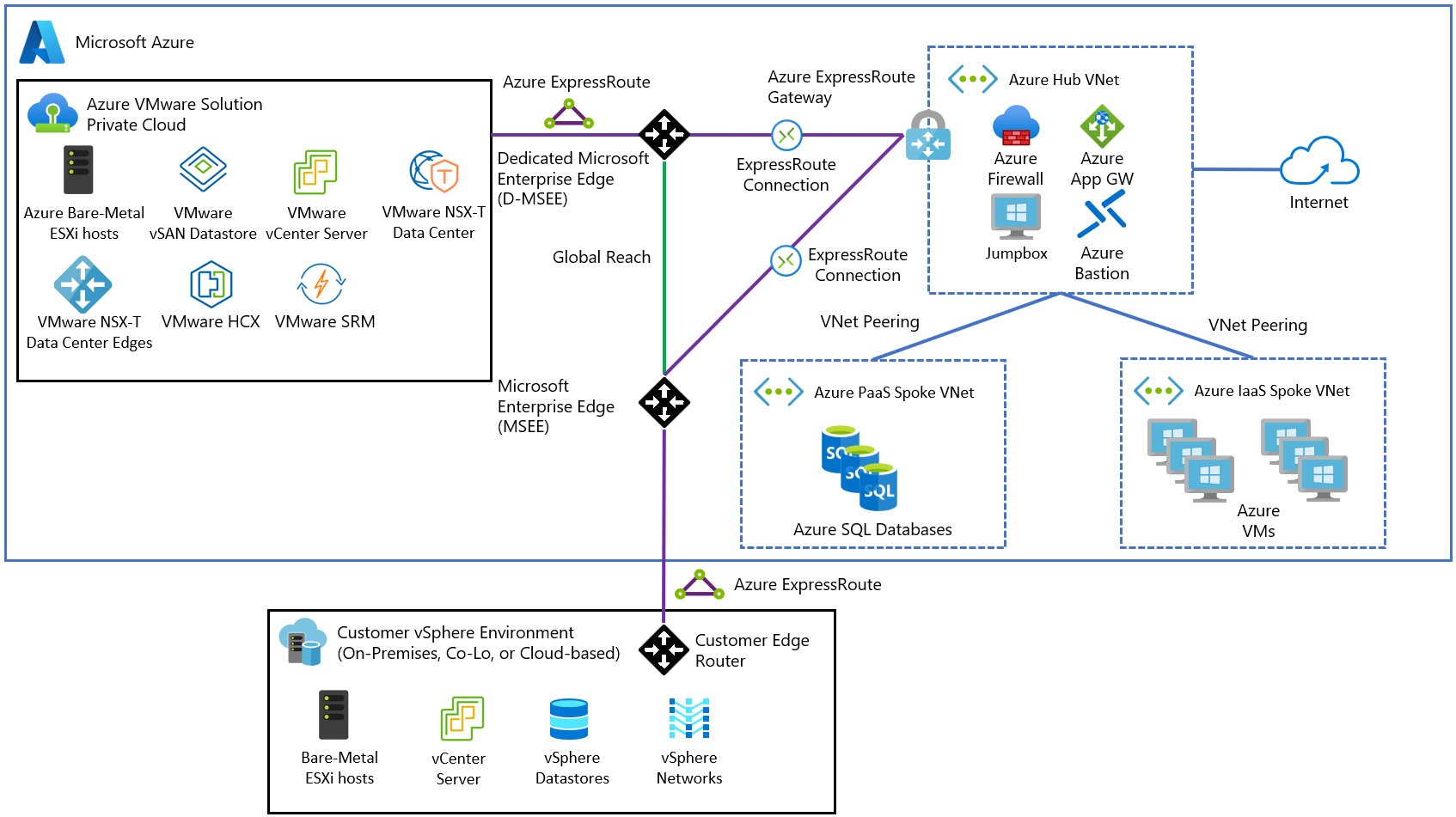
// Gen 1 — Dedicated AVS ExpressRoute Circuit · click to zoom
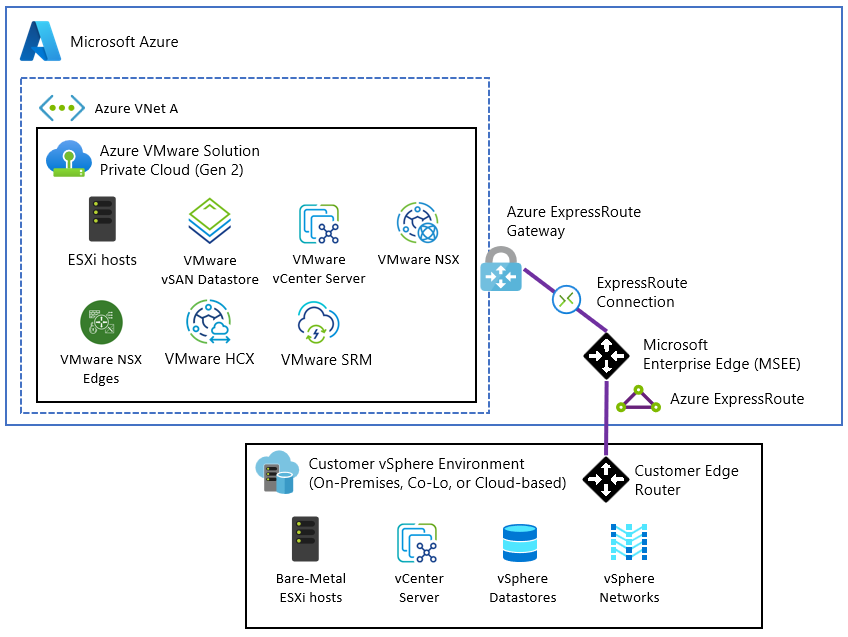
// Gen 2 — Native Azure VNet Integration · Source: Microsoft Learn · click to zoom
Here's how the two generations compare across the key dimensions:
⚠️ Gotchas to Watch Out For
Before you commit to a deployment or migration, here are some real-world considerations worth keeping front of mind:
If there's one thing that defines Gen 2, it's the shift from ExpressRoute to Virtual Network connectivity. In Gen 1, your AVS private cloud connected to Azure via an ExpressRoute circuit — a dedicated private link that, while reliable, added complexity, cost, and friction when integrating with other Azure services.
Gen 2 private clouds deploy inside an Azure Virtual Network by default. That means you get instant connectivity to other Azure services the moment your cloud is provisioned. No extra networking setup. VNet peering just works. You can attach Network Security Groups directly to control traffic. For architects who've spent time wrestling with AVS Gen 1 network topology, this is a significant quality-of-life improvement.
SKU Changes: AV64 Takes Centre Stage
Gen 2 exclusively supports the AV64 SKU, with a minimum of 3 hosts required. In Gen 1, deploying AV64 meant you first had to provision a seed cluster of at least three nodes using an older SKU (AV36, AV36P, AV48, or AV52), then add AV64 on top.
Gen 2 eliminates that step entirely — you go straight to AV64. The AV64 node is Microsoft's latest-generation VMware host, offering significantly more compute and memory than its predecessors. Removing the seed cluster requirement also reduces the minimum entry cost for new deployments.
vSAN: OSA Out, ESA In
Under the hood, Gen 2 moves from vSAN's Original Storage Architecture (OSA) to the Express Storage Architecture (ESA). ESA is VMware's newer storage model, designed to take advantage of NVMe-based storage more efficiently than OSA. You get better throughput, lower latency storage operations, and a more modern foundation for running I/O-intensive workloads.
For most workloads this will be transparent — but if you're running database servers, analytics platforms, or anything else with demanding storage requirements, the ESA upgrade is a genuine win.
Regional Availability
Gen 2 is currently available in the following Azure public regions. Microsoft has noted that additional regions may be available — contact your Microsoft account team to confirm coverage elsewhere.
Who is Responsible for What? Does it Change in Gen 2?
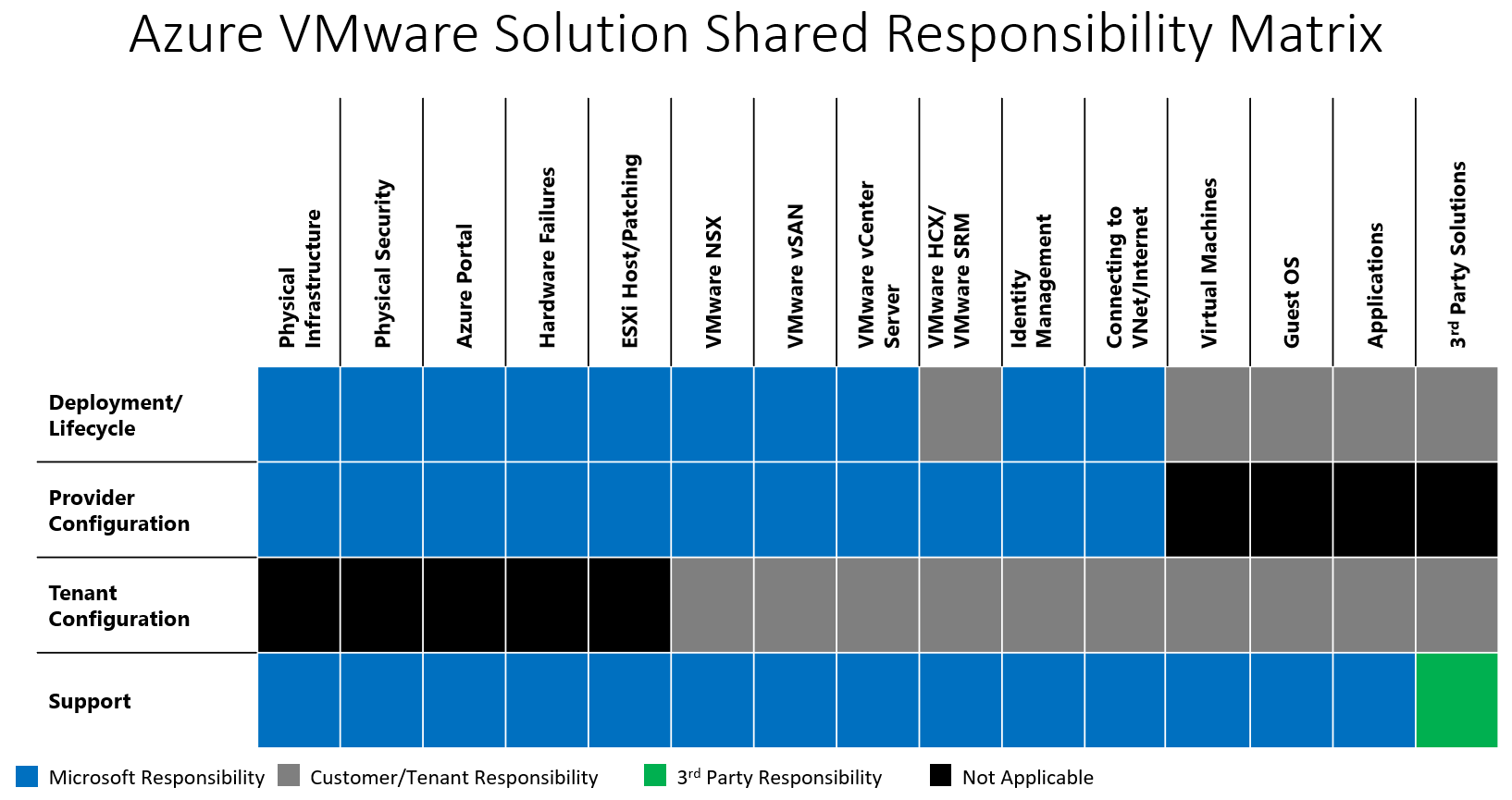
Short answer — no, it does not. The shared responsibility model remains the same in Gen 2 as it does in Gen 1. Despite the architectural shift to native VNet integration, Microsoft still owns the infrastructure layer and you still own everything above it. Gen 2 does not change the boundary, it just makes the networking around it simpler.
One of the most common sources of confusion with AVS is understanding where Microsoft's responsibility ends and yours begins. Unlike a traditional IaaS VM where you own almost everything above the hypervisor, AVS is a managed service — Microsoft takes on a significant portion of the operational burden, but that does not mean you can switch off entirely.
Microsoft handles the physical infrastructure, physical security, hardware failures, ESXi host patching, VMware NSX, vSAN, vCenter Server, and HCX Manager. You are responsible for things like your VMs, Guest OS, applications, identity management, and connecting to your VNet and the internet. The matrix below makes this clear:
Azure VMware Solution — Shared Responsibility Matrix · Source: Microsoft Learn · click to zoom
The practical takeaway here ties directly to the CloudAdmin gotcha above — because Microsoft owns the infrastructure layer, you cannot always get to the root cause of an issue yourself. Understanding this matrix before you go live helps set the right expectations with your team and your stakeholders.
Should You Move to Gen 2?
If you're planning a new AVS deployment, Gen 2 is the clear choice. The simplified networking, direct VNet integration, and removal of the seed cluster requirement make it easier to deploy and cheaper to get started. You're also building on a more modern foundation that will be better aligned with future Azure VMware Solution capabilities.
If you have an existing Gen 1 deployment, the picture is more nuanced. There's no in-place migration path between Gen 1 and Gen 2 — they're architecturally different enough that moving requires planning. If your Gen 1 environment is stable and serving its purpose, there's no immediate pressure to migrate. But for organisations looking to expand their AVS footprint, new clusters should absolutely be built on Gen 2.
Gen 2 feels like Microsoft finally listened. AVS has always been a solid platform, but it always had that slightly bolted-on feeling when it came to networking. Gen 2 fixes that. It sits inside your VNet, plays nicely with the rest of Azure, and removes a lot of the head-scratching that came with Gen 1. If you are starting fresh, there is really no reason to look at Gen 1. And if you are already running Gen 1, it is worth keeping an eye on the migration path as it matures.
And one final thought — AVS has a new look, a new networking model, and a new storage architecture... but why can I still not rename the cluster? 😂
Coming next: HCX — a deep dive into L2 network extensions and migrations.