HCX L2 Network Extensions, L3 Gateway Cutover and MON: What You Need to Know Before You Start
HCX Network Extension lets you stretch your on-premises L2 networks directly into Azure VMware Solution. No re-IP. No downtime. But it comes with a set of constraints that will catch you out if you go in blind.

Cloud Stack
Mar 23, 2026 · 8 min read
What Is HCX Network Extension?
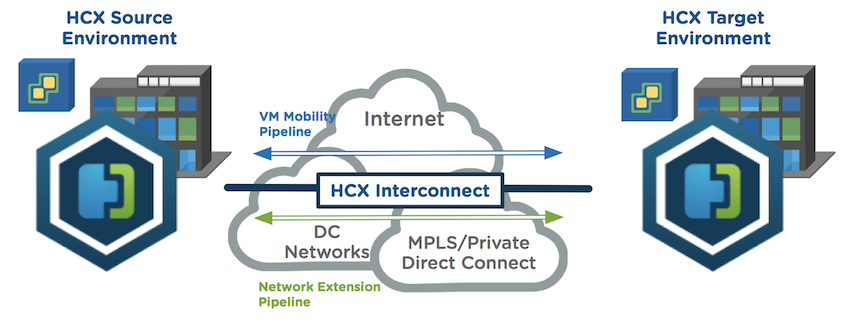
VMware HCX Network Extension (NE) lets you stretch L2 networks from on-premises into AVS. VMs can be migrated without changing their IP addresses, which removes one of the biggest friction points in any large-scale migration project. Phased cutovers become far more manageable when you're not re-IPing hundreds of machines.
Think of a Network Extension like a VPN tunnel between two locations, but instead of just providing IP reachability between sites, it actually stretches the Layer 2 network segment itself across the wire. With a standard VPN, your on-premises network and your cloud network are separate subnets that route to each other. With HCX NE, the on-premises network and the AVS network are the same subnet, shared across both locations. A VM on-premises and a VM in AVS can sit on the same /24, use the same default gateway, and communicate as if they were plugged into the same switch. The only difference is one of them is running in Azure.
This is what makes zero-downtime, zero-re-IP migrations possible. You move the VM, it keeps its IP address, and nothing upstream needs to change. The network follows the workload.
That said, HCX NE is not a set-and-forget feature. There are constraints, sequencing requirements, and routing behaviours that will cause real problems if you're not prepared for them.

HCX Service Mesh — on-premises to AVS via Layer 2 Network Extension · Source: Microsoft · click to zoom
⚠️ Gotchas to Watch Out For
HCX NE High Availability, How It Actually Works
HCX NE provides two layers of resiliency, and it's worth understanding both before you rely on them.
HCX creates multiple tunnel flows between Network Extension appliances for both Interconnect and Network Extension traffic. Traffic automatically takes the optimal path and shifts dynamically if conditions change between sites.
With HA enabled, HCX deploys four Network Extension appliances per vDS — two at the source site and two at the destination. These form a unified HA group. One pair becomes Active, the other sits as Standby. If the Active pair fails, the Standby pair immediately takes over. No manual intervention required.
HCX MON, What It Is and Why You Should Enable It
MON stands for Mobility Optimized Networking, and it's an optional HCX Enterprise feature that solves a specific problem: the trombone effect.
Here's the issue. With standard HCX NE, migrated VMs still rely on their on-premises default gateway even after they've moved to AVS. That means a VM running in AVS trying to talk to another VM also running in AVS may route all the way back to on-prem and back again. More hops, more latency, worse application performance.
MON fixes this by enabling selective cloud-side routing. Migrated VMs get a local gateway inside AVS, and traffic that should stay in AVS stays in AVS.
VM1 in AVS routes through the on-prem gateway and back to AVS to reach VM2. Every hop adds latency.
VM1 in AVS routes directly to VM2 in AVS. Local routing, lower latency, no trombone.
Under the hood, MON uses Policy-Based Routing inside NSX-T to make these decisions. Policy routes determine whether traffic should stay within AVS via the T1 gateway, head back on-prem through the HCX NE tunnel, or exit through the T0 gateway for Azure or internet access. MON handles path selection automatically and prevents the asymmetric routing issues that would otherwise follow you into production.
MON Policy Routes and Avoiding Asymmetric Traffic
MON is powerful, but it introduces routing decisions that need to be planned carefully. Get this wrong and you'll end up with asymmetric traffic flows, confused stateful firewalls, and connectivity problems that are painful to diagnose.
When MON is enabled and the VM gateway has been migrated to the cloud side, NSX-T advertises a /32 host route for each MON-enabled VM back to your connected hub via BGP. This is what allows other VMs in Azure and on-premises to reach the migrated VM directly without going through the Network Extension tunnel. The diagram below shows how the VM gateway migration eliminates the trombone effect for VM-to-VM traffic on stretched segments.
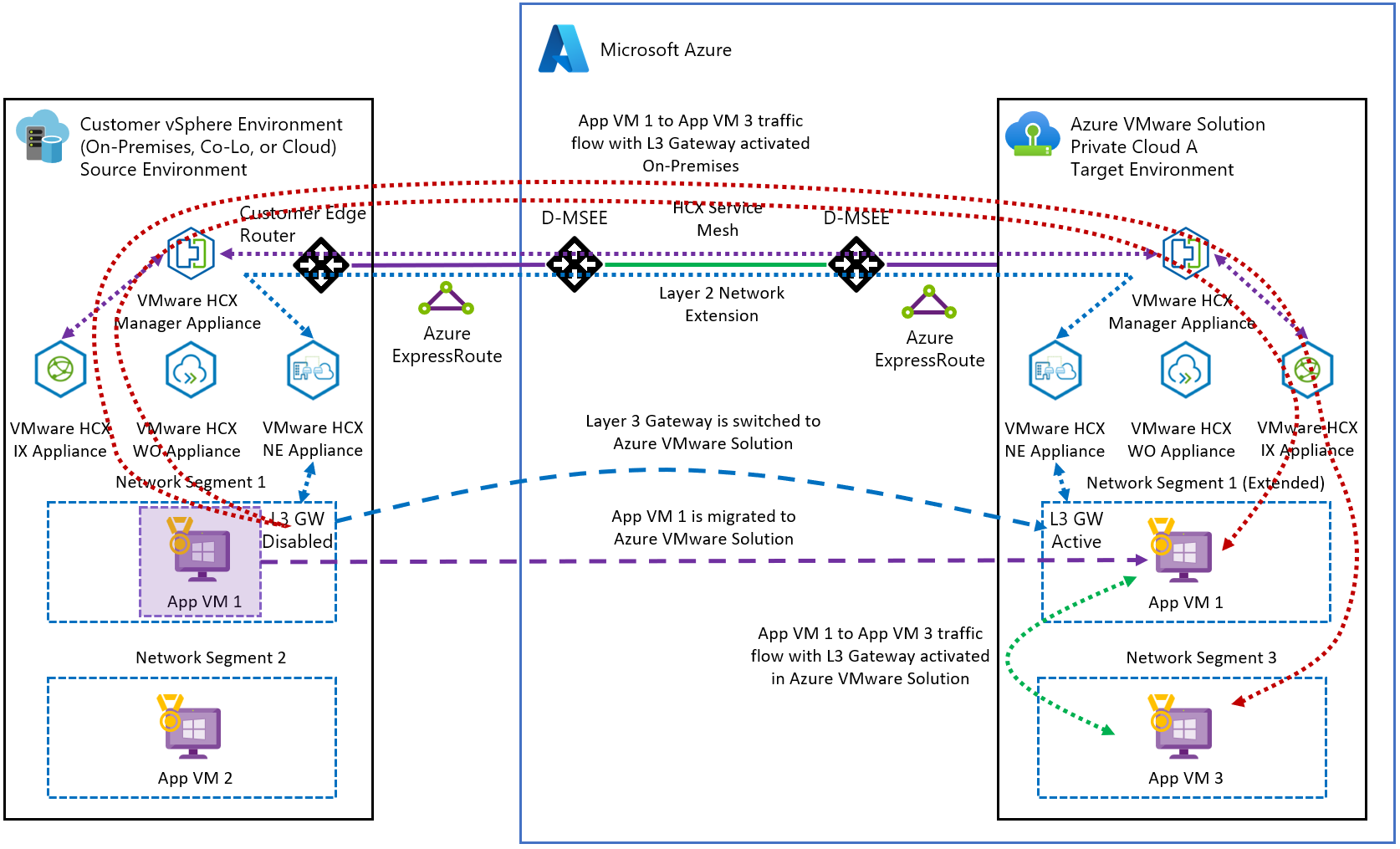
VM to VM L2 optimisation with MON enabled · Source: Microsoft Learn · click to zoom
By default, all RFC 1918 addresses are included in the MON policy route definition. This means all private IP egress traffic gets tunnelled back over the Network Extension path, while internet and public traffic routes out through the T0 gateway. That sounds sensible on the surface, but it can create problems.
Here's the scenario to watch out for. A VM in Azure learns the path to an AVS VM on a MON-enabled segment. Return traffic is sent back to the T0 gateway as expected. But if the return subnet matches an RFC 1918 policy route, that traffic gets forced over the Network Extension instead, and egresses back to Azure via ExpressRoute on the on-premises side. Stateful firewalls in the path see asymmetric flows and things start breaking.
The three policy route configurations and what they do:
Default RFC 1918 policy routes — all private IP egress traffic is tunnelled over the Network Extension. Internet and public traffic routes through the T0 gateway. Use with caution and only if your infrastructure accounts for the asymmetric routing implications.
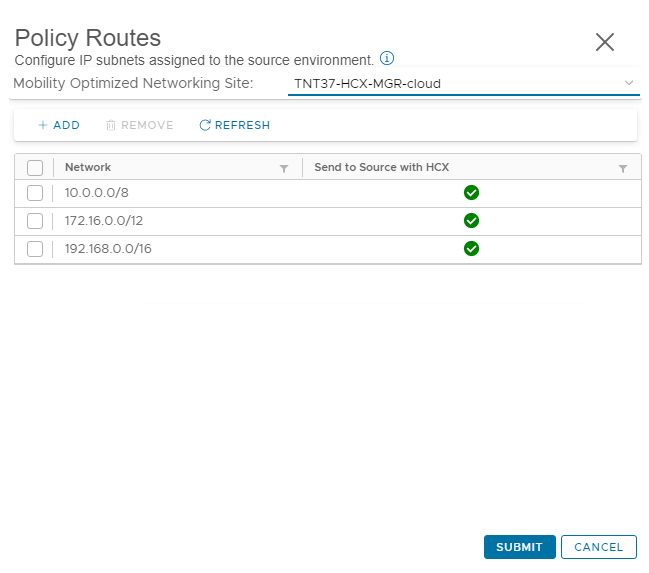
Default RFC 1918 policy routes · Source: Microsoft Learn · click to zoom
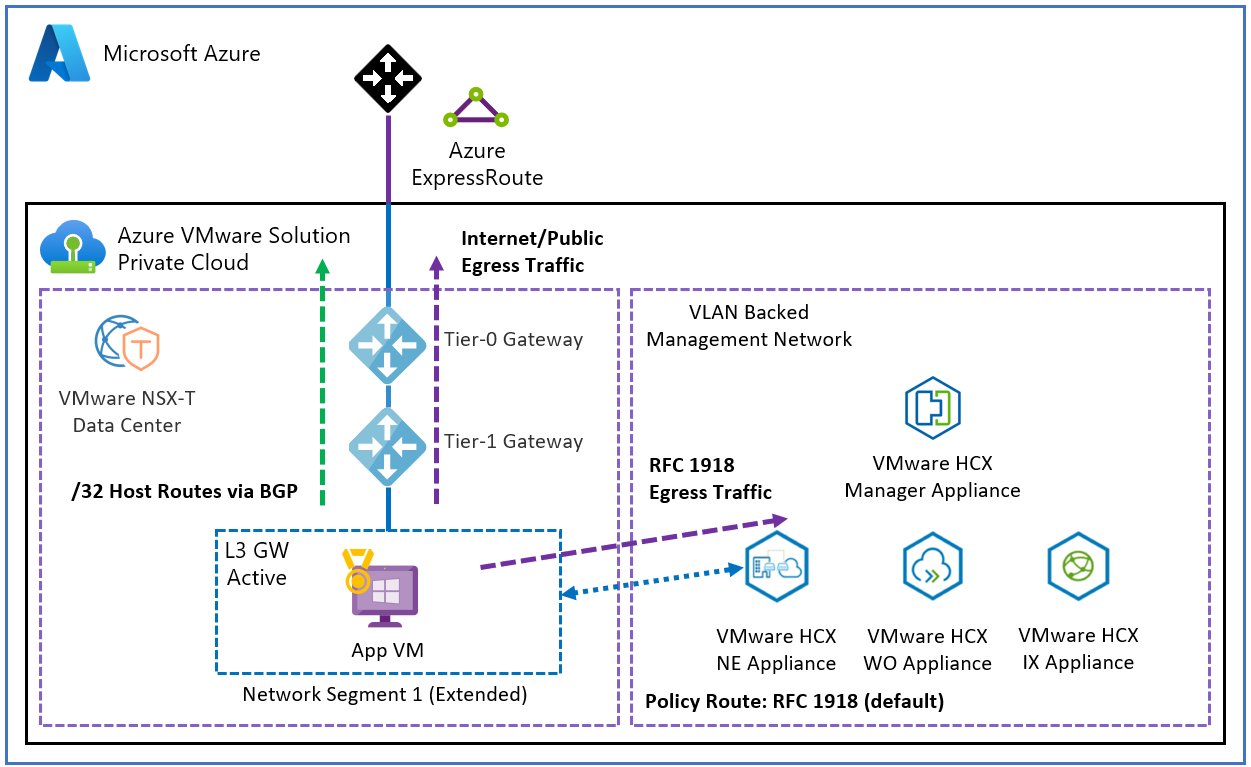
RFC 1918 egress traffic flow with default policy routes · Source: Microsoft Learn · click to zoom
No policy routes defined — all egress traffic routes through the T0 gateway. This is the safest option if you haven't specifically designed your network to handle MON policy routing. When in doubt, start here.
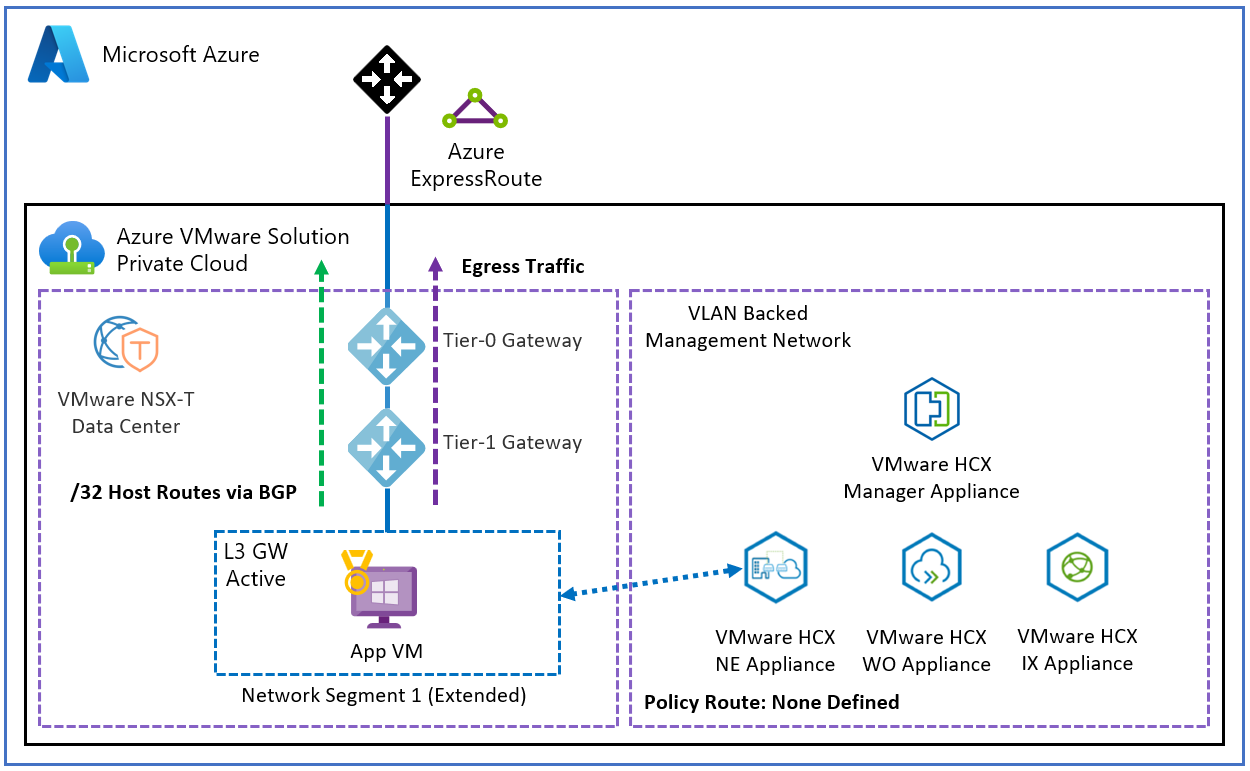
No policy routes — all traffic via T0 · Source: Microsoft Learn · click to zoom
Default route (0.0.0.0/0) — all egress traffic, including internet, gets tunnelled over the Network Extension path. Only use this if you specifically want all traffic going back on-premises first.
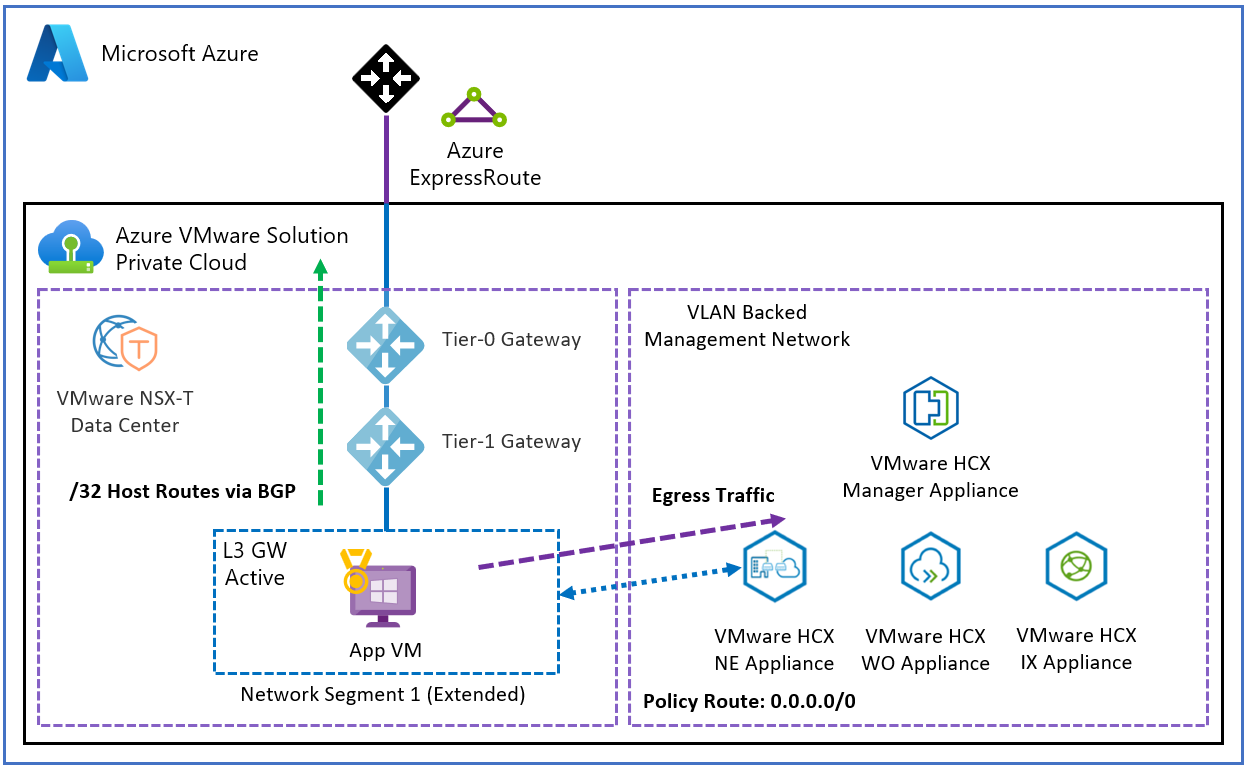
0.0.0.0/0 policy route — all traffic tunnelled over Network Extension · Source: Microsoft Learn · click to zoom
Wrapping Up
If you're planning to use HCX for a phased migration, getting your head around NE and MON early will save you a lot of pain. The technology is solid but the sequencing, HA configuration, and BGP routing behaviour are exactly the kind of things that don't show up until you're in the middle of a cutover window.
Test everything. Enable HA first. And run that network cutover dry-run before you commit to production.
Coming next: HCX migration types — RAV, Bulk, vMotion, and when to use each one.