HCX Migration Types: RAV, Bulk, vMotion, Cold and OSAM
HCX gives you five ways to move workloads into Azure VMware Solution. Pick the wrong one and you'll either burn your maintenance window or wonder why your migration is crawling at 3am.

Cloud Stack
Apr 2, 2026 · 10 min read
Before You Start: Check Your EVC Compatibility
Before you even look at migration types, sort out your EVC compatibility. This one catches people out more than almost anything else on AVS projects.
EVC masks CPU instruction sets at the cluster level so VMs can vMotion between hosts with different CPU generations without falling over. When you're migrating from on-premises into AVS, you're moving VMs between two environments that are almost certainly running on different CPU generations. If your on-premises cluster EVC baseline is higher than what AVS is running, live migration is blocked.
That means vMotion and RAV are both off the table. You're doing Cold Migration until you sort it out. Fixing it means lowering your EVC baseline on-premises, which requires powering off or evacuating VMs first. That work needs to happen well before your migration window, not the night before.
AVS runs on current-generation Azure dedicated hardware, so it'll typically be running a higher EVC baseline than an older on-premises cluster. Pull up the VMware EVC compatibility matrix, compare it against your cluster CPU generations, and get any remediation into the project plan early.
The Five Migration Types at a Glance
Everyone knows vMotion. VM stays on, moves live, cutover is instant. No downtime, no drama.
The problem is scale. vCenter caps at 8 concurrent vMotions and queues the rest. Submit 50 VMs and you'll be watching a progress bar for a very long time. It's the right tool for the last handful of critical VMs in a wave, not for shifting hundreds of machines.
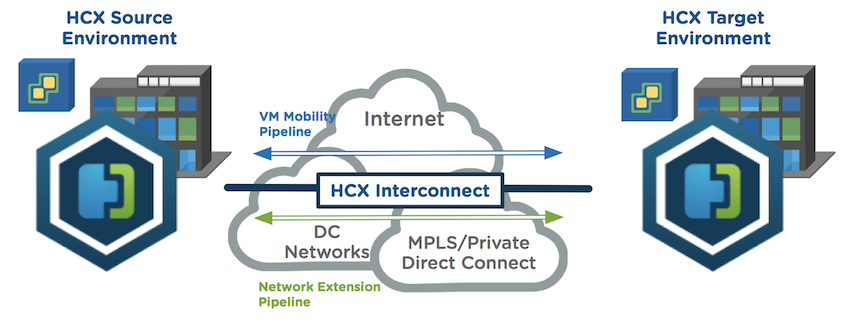
HCX handles all the vMotion traffic over the Interconnect and encrypts it in transit, so you're not wrestling with routing vMotion traffic directly across to AVS.
⚠️ Gotchas
Bulk uses vSphere Replication to copy VM disks to AVS in the background while the VM keeps running on-premises. When you hit your migration window, it powers the VM off, does a final delta sync, and powers it back on in AVS. The outage is usually a few minutes.
This is what most of your migration waves will use. It scales well, you can run large numbers of VMs in parallel, and you can schedule windows in advance. One thing worth knowing: Bulk creates a fresh VM at the destination rather than moving the original. The source stays put until you're happy and manually tidy up.
⚠️ Gotchas
RAV does what Bulk and vMotion can't do individually. It replicates VM disks to AVS in the background using vSphere Replication, keeps syncing delta changes while the VM runs on-premises, and then when your switchover window hits, a final delta vMotion hands the running VM over with no downtime.
It's the right pick for large VMs where you need zero downtime but can't afford to wait for a live vMotion of several hundred gigabytes of data across an ExpressRoute. Databases and file servers are the obvious candidates.
How RAV Works Under the Hood
There are three phases. First, Base Sync copies the full disk contents to AVS using vSphere Replication. Once that finishes, Delta Sync kicks in and keeps replicating changed blocks while the VM carries on running. When your switchover window opens, a Delta vMotion cuts the live VM state across with minimal disruption. Multiple VMs replicate concurrently during the sync phases, but the final switchover runs serially, one VM at a time per Service Mesh pair.
RAV handles latency and varying network conditions reasonably well during the sync phases, which matters on a WAN migration over ExpressRoute. You need 150 Mbps or above throughput and HCX Enterprise activated in AVS before you can use it.
⚠️ Gotchas
Cold Migration is exactly what it sounds like. Power the VM off on-premises, copy the disks to AVS, power it back on. No replication, no delta syncing, no complexity.
It's the simplest option available and works well for anything that has an agreed maintenance window. Legacy systems, test boxes, low-priority workloads. It's also your fallback if EVC compatibility rules out live migration entirely.
⚠️ Gotchas
Not everyone migrating to AVS is coming from a pure vSphere environment. If you've got Hyper-V or KVM workloads in the mix, OSAM lets you move them directly into AVS without doing a conversion first.
It works by installing a lightweight agent inside the guest OS. The replication is driven from inside the VM rather than at the hypervisor level, so the underlying platform doesn't matter. Windows and Linux guests are both supported.
⚠️ Gotchas
For most projects you'll end up using Bulk for the majority of VMs and RAV for anything business critical that needs zero downtime. vMotion is there for the small number of VMs at the end of a wave where you need a clean live cutover. Cold Migration is your friend for anything with an agreed window or an EVC problem. OSAM handles anything that isn't vSphere.
Don't reach for vMotion by default just because it feels familiar. It won't scale. Spend time getting comfortable with RAV on a small batch early in the project and it'll carry the weight of your production waves.
And sort your EVC compatibility before you get anywhere near a migration window.